LangGraph Persistence - part.01
LangGraph의 영속성(persistence) 구조 정리
Persistence 개요
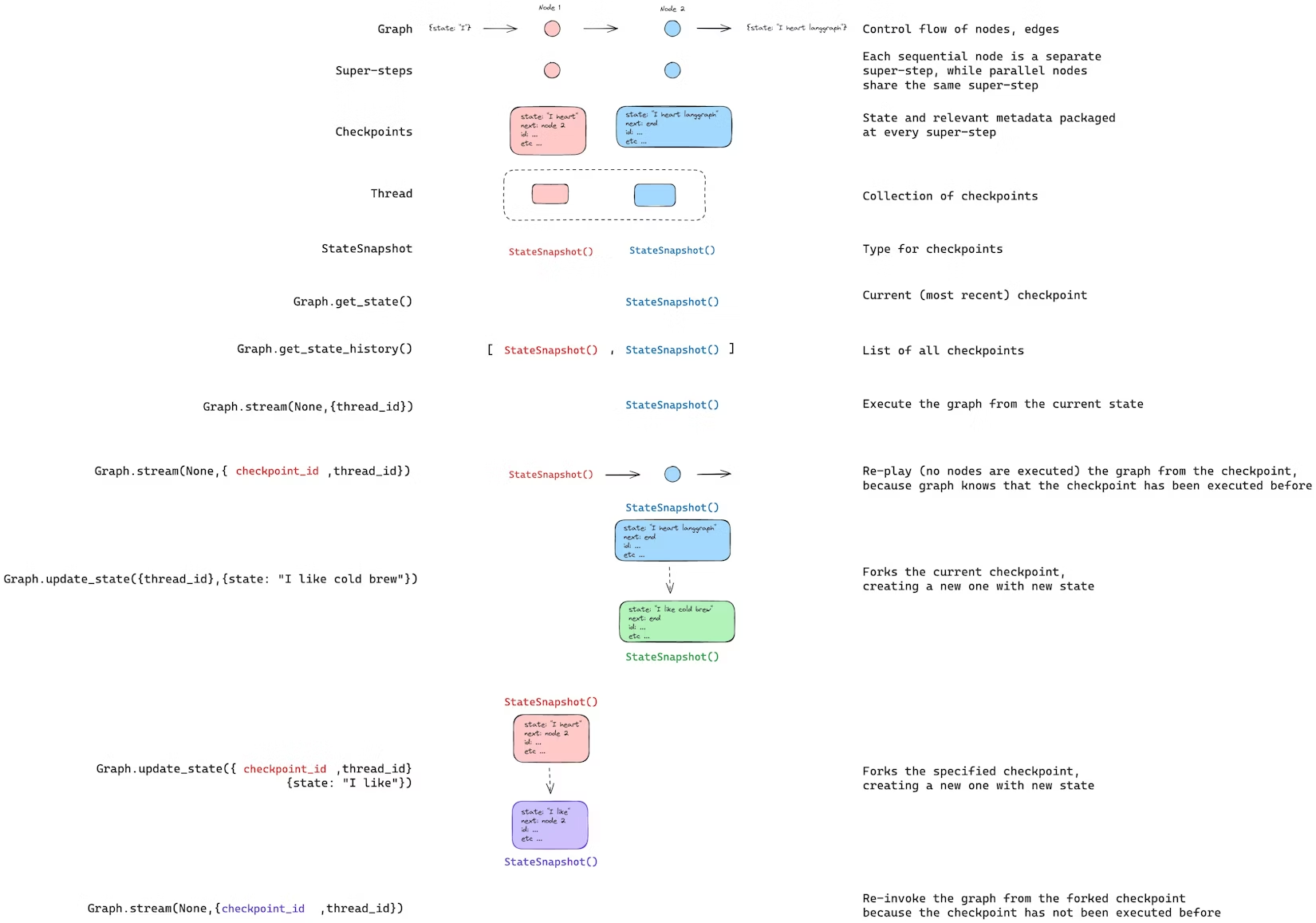
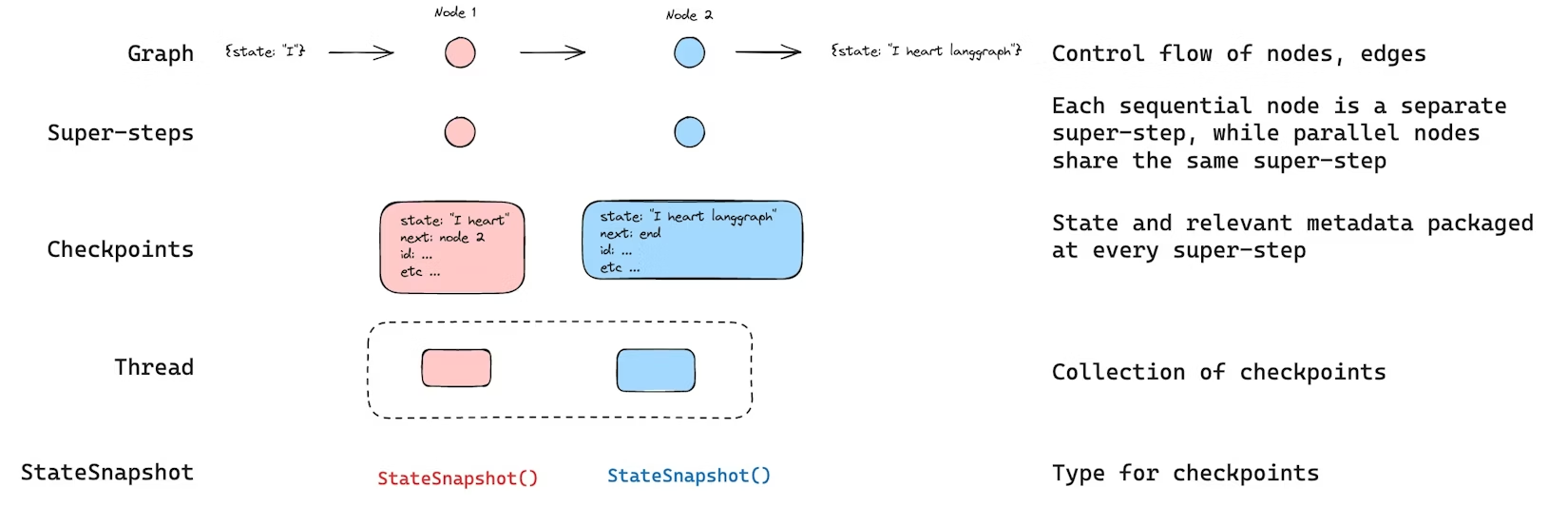
LangGraph에는 checkpointer로 구현된 내장 persistence 레이어가 있다. 그래프를 checkpointer와 함께 compile하면, 매 super-step마다 그래프 상태의 스냅샷인 checkpoint를 저장한다. 저장된 checkpoint는 thread에 쌓이며, 그래프 실행이 끝난 뒤에도 thread를 통해 상태를 조회할 수 있다.
이 구조 덕분에 다음과 같은 기능이 가능해진다.
- Human-in-the-loop(사람이 중간에 확인/승인/수정)
- Memory(대화/상호작용의 상태 유지)
- Time travel(과거 시점 재생 및 분기)
- Fault-tolerance(실패 시 마지막 성공 지점부터 복구)
Agent Server를 사용하는 경우 checkpointing은 서버에서 자동 처리하므로, checkpointer를 직접 구현/설정하지 않아도 된다.
Threads
thread는 checkpointer가 저장하는 checkpoint들을 묶는 단위이며, 각 checkpoint는 thread_id라는 고유 식별자에 귀속된다. 쉽게 말해 “한 번의 대화/실행 흐름을 식별하는 ID”라고 보면 된다. run이 실행되면, 해당 run의 그래프 state가 thread에 지속적으로 기록된다.
그래프를 checkpointer와 함께 실행할 때는 반드시 config의 configurable 영역에 thread_id를 지정해야 한다.
1
{"configurable": {"thread_id": "1"}}
thread의 현재 상태뿐 아니라 과거 상태(히스토리)도 조회할 수 있다. 또한 state를 저장하려면, 실행 전에 thread가 존재해야 한다. LangSmith API는 thread 생성/관리 및 thread state 관련 엔드포인트를 제공한다.
checkpointer는 thread_id를 primary key로 사용해 checkpoint를 저장/조회한다. thread_id가 없으면 다음이 불가능해진다.
- 상태 저장 자체가 불가능
- interrupt 이후 resume 불가능(저장된 상태를
thread_id로 로드하기 때문)
Checkpoints
특정 시점의 thread 상태 스냅샷을 checkpoint라고 한다. checkpoint는 매 super-step마다 저장되며, LangGraph에서는 이를 StateSnapshot 객체로 표현한다. 주요 속성은 다음과 같다.
config: 해당 checkpoint에 사용된 configmetadata: checkpoint에 대한 메타데이터values: 해당 시점 state 채널 값next: 다음에 실행될 노드 이름 튜플tasks: 다음 실행 작업 목록(PregelTask) 튜플- 이전 시도에서 실패했다면 error 정보 포함
- 노드 내부에서 동적으로 interrupt된 경우, interrupts 관련 추가 데이터 포함
checkpoint는 영속 저장되며, 나중에 특정 시점 상태로 복구하는 데 사용된다.
예시: 간단 그래프에서 checkpoint가 몇 개 저장되는가
아래 예시는 InMemorySaver를 checkpointer로 붙인 뒤, 단순한 두 노드 그래프를 실행한다.
1
2
3
4
5
6
7
8
9
10
11
12
13
14
15
16
17
18
19
20
21
22
23
24
25
26
27
28
29
from langgraph.graph import StateGraph, START, END
from langgraph.checkpoint.memory import InMemorySaver
from langchain_core.runnables import RunnableConfig
from typing import Annotated
from typing_extensions import TypedDict
from operator import add

class State(TypedDict):
    foo: str
    bar: Annotated[list[str], add]

def node_a(state: State):
    return {"foo": "a", "bar": ["a"]}

def node_b(state: State):
    return {"foo": "b", "bar": ["b"]}

workflow = StateGraph(State)
workflow.add_node(node_a)
workflow.add_node(node_b)
workflow.add_edge(START, "node_a")
workflow.add_edge("node_a", "node_b")
workflow.add_edge("node_b", END)

checkpointer = InMemorySaver()
graph = workflow.compile(checkpointer=checkpointer)

config: RunnableConfig = {"configurable": {"thread_id": "1"}}
graph.invoke({"foo": "", "bar":[]}, config)
실행 후 총 4개의 checkpoint가 저장되는 것이 기대된다.
- 빈 checkpoint, 다음 노드는
START - 사용자 입력
{'foo': '', 'bar': []}반영, 다음 노드는node_a node_a출력{'foo': 'a', 'bar': ['a']}반영, 다음 노드는node_bnode_b출력{'foo': 'b', 'bar': ['a', 'b']}반영, 다음 노드 없음(종료)
여기서 bar는 reducer(add)가 있으므로, 노드 결과가 overwrite가 아니라 누적되어 ['a', 'b'] 형태가 된다.
Get state
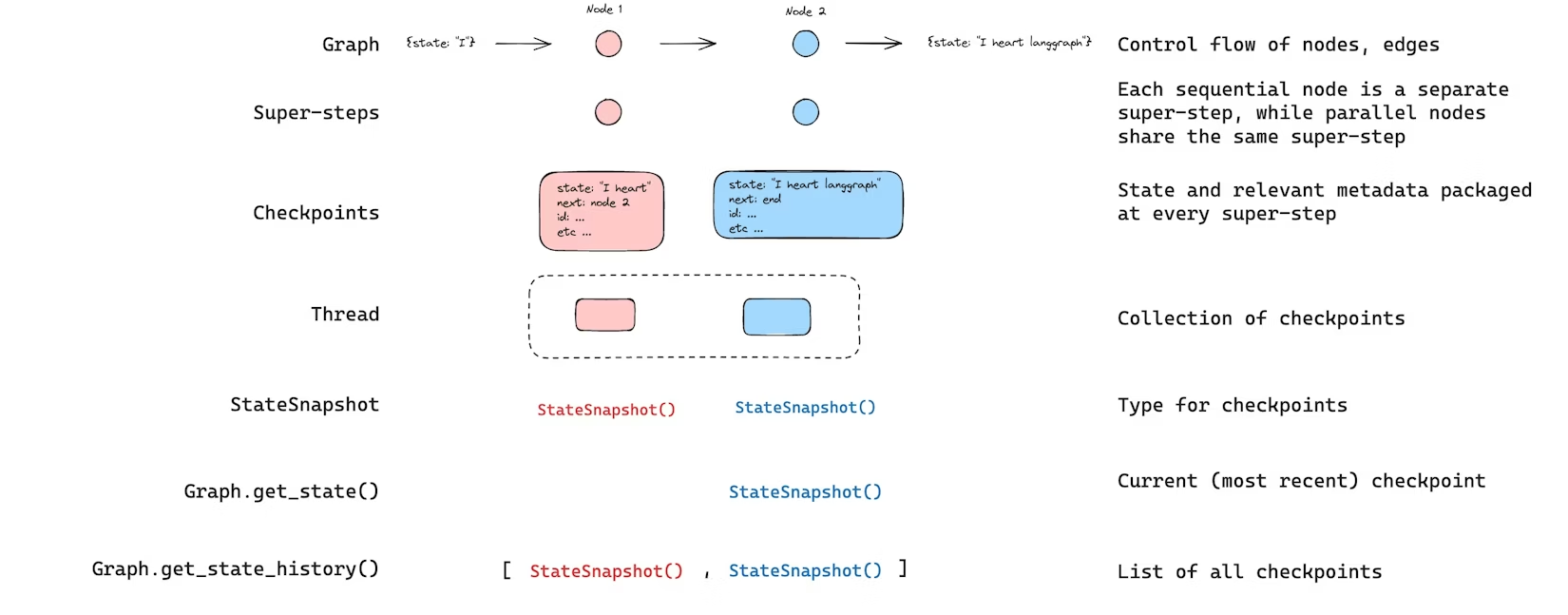
저장된 상태를 다룰 때는 반드시 thread_id가 필요하다. 최신 상태는 graph.get_state(config)로 조회하며, 결과는 StateSnapshot이다.
1
2
3
4
5
6
7
# 최신 state snapshot
config = {"configurable": {"thread_id": "1"}}
graph.get_state(config)

# 특정 checkpoint_id의 snapshot
config = {"configurable": {"thread_id": "1", "checkpoint_id": "1ef663ba-28fe-6528-8002-5a559208592c"}}
graph.get_state(config)
예시 출력은 다음과 같은 형태이다(구조 이해가 목적이다).
values: 최종 값next: 다음 노드(종료면 빈 튜플)config: thread_id, checkpoint_id 등metadata: step, writes 등parent_config: 부모 checkpoint 참조tasks: 다음 작업 목록
Get state history
thread의 전체 실행 히스토리는 graph.get_state_history(config)로 조회한다. 반환은 StateSnapshot 리스트이며, 가장 최근 checkpoint가 리스트의 첫 번째로 온다.
1
2
config = {"configurable": {"thread_id": "1"}}
list(graph.get_state_history(config))
Replay
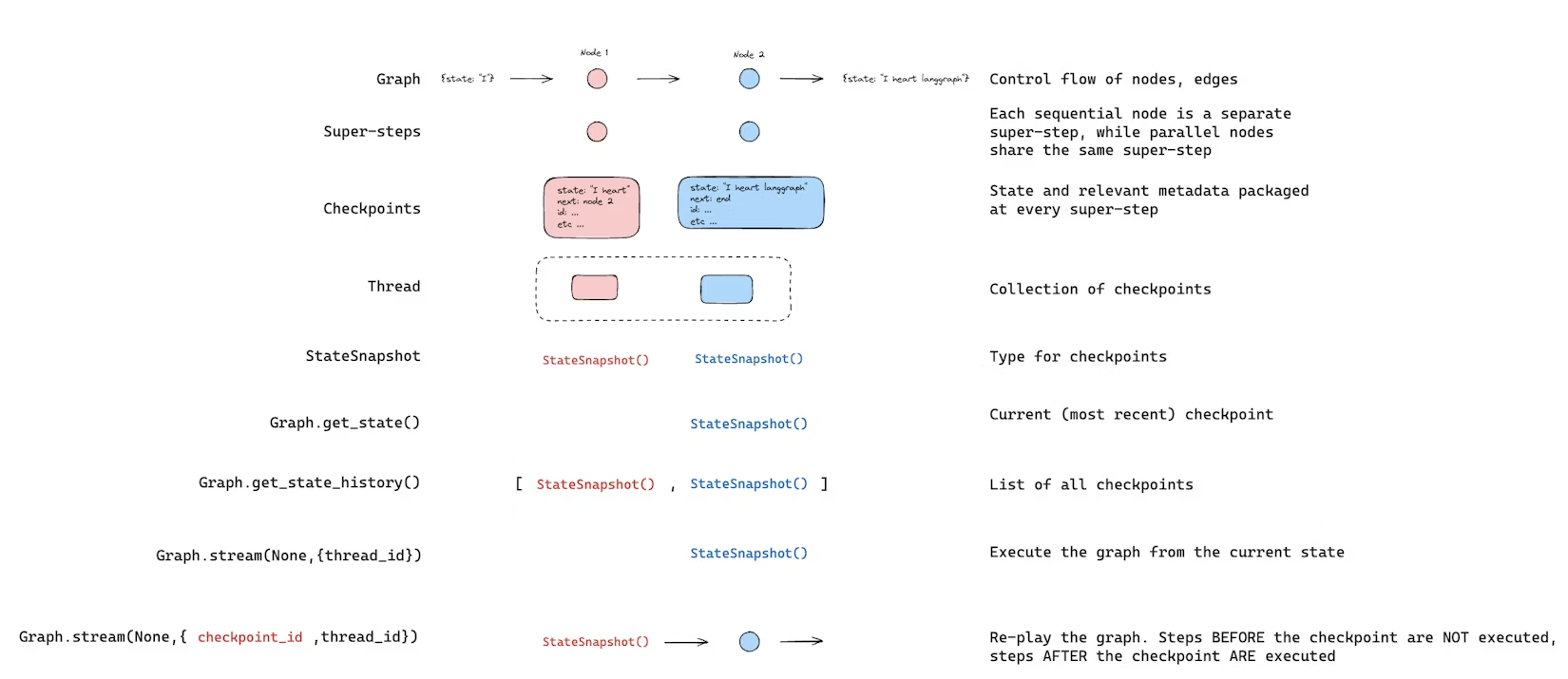
과거 실행을 재생(replay)하는 것도 가능하다. thread_id와 checkpoint_id를 함께 넣어 invoke하면, 해당 checkpoint_id에 대응되는 checkpoint 이전 단계는 재생되고, 이후 단계만 실제로 다시 실행된다.
thread_id: thread의 IDcheckpoint_id: thread 내 특정 checkpoint 식별자
1
2
config = {"configurable": {"thread_id": "1", "checkpoint_id": "0c62ca34-ac19-445d-bbb0-5b4984975b2a"}}
graph.invoke(None, config=config)
LangGraph는 특정 step이 이미 실행되었는지 알고 있다. 이미 실행된 step은 “재실행”이 아니라 “재생”으로 처리되며, checkpoint_id 이후 단계는 새 분기(fork)로 실행된다.
Update state
checkpoint 기반 재생뿐 아니라, 그래프 state 자체를 편집할 수도 있다. 이를 위해 update_state를 사용한다. 이 메서드는 크게 3가지 인자를 이해하면 된다.
1) config
어느 thread를 업데이트할지 지정한다.
thread_id만 주면 “현재 최신 상태”를 업데이트(또는 최신 지점에서 fork)checkpoint_id까지 주면 “특정 checkpoint를 기준으로 fork 후 업데이트”
2) values
업데이트할 값이다. 중요한 점은 이 업데이트가 “노드가 state를 업데이트하는 것과 동일한 규칙”으로 처리된다는 점이다.
- reducer가 없는 채널: overwrite
- reducer가 있는 채널: reducer 규칙에 따라 병합(예: append)
예를 들어 state schema가 아래와 같다고 하자.
1
2
3
4
5
6
7
from typing import Annotated
from typing_extensions import TypedDict
from operator import add

class State(TypedDict):
    foo: int
    bar: Annotated[list[str], add]
현재 state가 다음이라면,
1
{"foo": 1, "bar": ["a"]}
아래처럼 업데이트할 때,
1
graph.update_state(config, {"foo": 2, "bar": ["b"]})
결과는 다음이 된다.
foo: reducer 없음 → 2로 overwritebar: reducer(add) 있음 →["a", "b"]로 누적
1
{"foo": 2, "bar": ["a", "b"]}
3) as_node
옵션으로 as_node를 줄 수 있다. 이는 “이 업데이트가 특정 노드에서 나온 것처럼” 처리하겠다는 의미이다. 다음 실행 노드 결정이 “마지막으로 state를 업데이트한 노드”에 따라 달라질 수 있으므로, as_node로 다음 흐름을 제어할 수 있다.