LangGraph Workflows와 Agents - part.3
LangGraph의 Orchestrator-worker 패턴 구조와 Graph API / Functional API 예제로 이해한다.
Orchestrator-worker
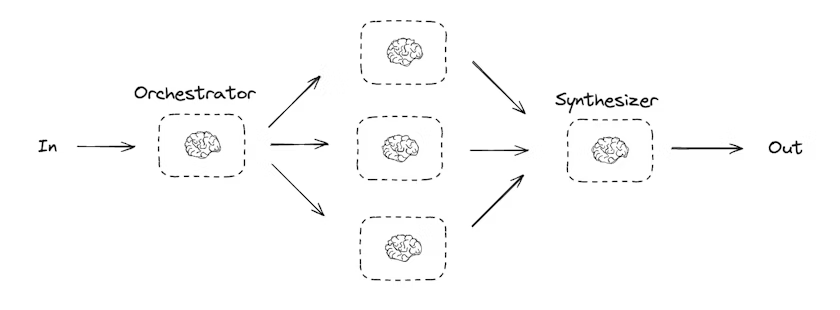
Orchestrator-worker 패턴은 하나의 중앙 오케스트레이터가 전체 작업을 계획하고, 세부 작업을 여러 워커에게 위임한 뒤, 그 결과를 다시 수집·종합하는 구조이다. 이 패턴에서 오케스트레이터는 다음과 같은 역할을 수행한다.
- 전체 작업을 여러 subtask로 분해한다.
- 각 subtask를 worker에게 위임한다.
- worker 결과를 취합(synthesize)해 최종 결과를 만든다.
기본 개념
- Orchestrator: 전체 계획을 수립하고 어떤 워커가 어떤 일을 할지 결정한다.
- Worker: 오케스트레이터로부터 전달받은 단일 작업 단위를 수행한다.
- Synthesizer: 여러 워커의 결과를 하나의 결과물로 합성한다.
이 구조는 코드 생성, 대규모 문서 작성, 다중 파일 수정처럼 작업 범위가 유동적인 문제에서 자주 사용된다.
Parallelization처럼 서브태스크를 미리 고정된 형태로 나누기 어려울 때 특히 유용하며, 서브태스크의 개수나 내용이 입력에 따라 달라지는 상황에 잘 맞는다. 예를 들어 여러 Python 라이브러리의 설치 가이드를 문서 여러 개에 걸쳐 업데이트해야 하는데 문서 개수가 사전에 확정되지 않았거나, 보고서의 섹션 구성이 주제에 따라 달라지는 경우에 Orchestrator-worker 패턴을 적용하기 좋다.
아래 예시는 “보고서 작성”을 주제로 orchestrator가 보고서 섹션 계획을 만들고, worker들이 각 섹션을 작성한 뒤, synthesizer가 이를 합치는 흐름을 보여준다.
Orchestrator/Worker 계획 스키마 정의
아래는 계획(planning)에 사용할 structured output 스키마이다. 섹션 이름과 섹션이 다룰 내용을 포함한다.
1
2
3
4
5
6
7
8
9
10
11
12
13
14
15
16
17
from typing import Annotated, List
import operator
from pydantic import BaseModel, Field

# Schema for structured output to use in planning
class Section(BaseModel):
    name: str = Field(
        description="Name for this section of the report.",
    )
    description: str = Field(
        description="Brief overview of the main topics and concepts to be covered in this section.",
    )

class Sections(BaseModel):
    sections: List[Section] = Field(
        description="Sections of the report.",
    )
그리고 LLM을 structured output으로 보강하여 planner로 사용한다.
1
2
# Augment the LLM with schema for structured output
planner = llm.with_structured_output(Sections)
Functional API 예시: orchestrator가 계획 생성 → worker가 섹션 작성 → synthesizer가 최종 합성
아래 코드는 Functional API로 작성된 orchestrator-worker 예시이다.
1
2
3
4
5
6
7
8
9
10
11
12
13
14
15
16
17
18
19
20
21
22
23
24
25
26
27
28
29
30
31
32
33
34
35
36
37
38
39
40
41
42
43
44
45
46
47
48
49
50
51
52
from typing import List
from langgraph.func import entrypoint, task
from langchain.messages import HumanMessage, SystemMessage

@task
def orchestrator(topic: str):
    """Orchestrator that generates a plan for the report"""
    # Generate queries
    report_sections = planner.invoke(
        [
            SystemMessage(content="Generate a plan for the report."),
            HumanMessage(content=f"Here is the report topic: {topic}"),
        ]
    )
    return report_sections.sections

@task
def llm_call(section: Section):
    """Worker writes a section of the report"""

    # Generate section
    result = llm.invoke(
        [
            SystemMessage(content="Write a report section."),
            HumanMessage(
                content=f"Here is the section name: {section.name} and description: {section.description}"
            ),
        ]
    )

    # Write the updated section to completed sections
    return result.content

@task
def synthesizer(completed_sections: list[str]):
    """Synthesize full report from sections"""
    final_report = "\n\n---\n\n".join(completed_sections)
    return final_report

@entrypoint()
def orchestrator_worker(topic: str):
    sections = orchestrator(topic).result()
    section_futures = [llm_call(section) for section in sections]
    final_report = synthesizer(
        [section_fut.result() for section_fut in section_futures]
    ).result()
    return final_report

# Invoke
report = orchestrator_worker.invoke("Create a report on LLM scaling laws")
from IPython.display import Markdown
Markdown(report)
이 구성의 핵심은 다음과 같다.
- orchestrator가 섹션 목록을 “동적으로” 만든다.
- worker는 섹션 단위로 작업한다.
- 섹션 수가 고정되어 있지 않아도, futures 리스트로 병렬 실행한 뒤 결과를 모아 합성할 수 있다.
Creating workers in LangGraph
Orchestrator-worker 패턴은 실무에서 매우 흔하며, LangGraph는 이를 위한 built-in 지원을 제공한다. 그중 핵심이 Send API이다.
SendAPI는 worker 노드를 “동적으로 생성/호출”하고, 각 worker에 특정 입력을 보낼 수 있게 한다.- 각 worker는 자신만의 state를 갖는다.
- 모든 worker의 출력은 orchestrator 그래프가 접근 가능한 “공유 state key”에 기록된다.
- orchestrator는 공유 state를 통해 모든 worker 출력에 접근하고, 이를 기반으로 최종 결과를 합성한다.
아래 예시는 섹션 리스트를 순회하며 각 섹션을 worker에게 보내고(Send), worker들이 섹션을 작성한 뒤, synthesizer가 합치는 흐름이다.
1
2
3
4
5
6
7
8
9
10
11
12
13
14
15
16
17
18
19
20
21
22
23
24
25
26
27
28
29
30
31
32
33
34
35
36
37
38
39
40
41
42
43
44
45
46
47
48
49
50
51
52
53
54
55
56
57
58
59
60
61
62
63
64
65
66
67
68
69
70
71
72
73
74
75
76
77
78
79
80
81
82
83
84
85
86
87
88
89
90
91
92
93
94
95
96
97
98
99
100
101
from typing_extensions import TypedDict
from typing import Annotated
import operator

from langchain.messages import HumanMessage, SystemMessage
from langgraph.graph import StateGraph, START, END
from langgraph.types import Send

# (앞에서 정의한 Section, Sections, planner를 그대로 사용한다고 가정한다.)

# Graph state
class State(TypedDict):
    topic: str  # Report topic
    sections: list[Section]  # List of report sections
    completed_sections: Annotated[
        list, operator.add
    ]  # All workers write to this key in parallel
    final_report: str  # Final report

# Worker state
class WorkerState(TypedDict):
    section: Section
    completed_sections: Annotated[list, operator.add]

# Nodes
def orchestrator(state: State):
    """Orchestrator that generates a plan for the report"""

    # Generate queries
    report_sections = planner.invoke(
        [
            SystemMessage(content="Generate a plan for the report."),
            HumanMessage(content=f"Here is the report topic: {state['topic']}"),
        ]
    )

    return {"sections": report_sections.sections}

def llm_call(state: WorkerState):
    """Worker writes a section of the report"""

    # Generate section
    section = llm.invoke(
        [
            SystemMessage(
                content="Write a report section following the provided name and description. Include no preamble for each section. Use markdown formatting."
            ),
            HumanMessage(
                content=f"Here is the section name: {state['section'].name} and description: {state['section'].description}"
            ),
        ]
    )

    # Write the updated section to completed sections
    return {"completed_sections": [section.content]}

def synthesizer(state: State):
    """Synthesize full report from sections"""

    # List of completed sections
    completed_sections = state["completed_sections"]

    # Format completed section to str to use as context for final sections
    completed_report_sections = "\n\n---\n\n".join(completed_sections)

    return {"final_report": completed_report_sections}

# Conditional edge function to create llm_call workers that each write a section of the report
def assign_workers(state: State):
    """Assign a worker to each section in the plan"""

    # Kick off section writing in parallel via Send() API
    return [Send("llm_call", {"section": s}) for s in state["sections"]]

# Build workflow
orchestrator_worker_builder = StateGraph(State)

# Add the nodes
orchestrator_worker_builder.add_node("orchestrator", orchestrator)
orchestrator_worker_builder.add_node("llm_call", llm_call)
orchestrator_worker_builder.add_node("synthesizer", synthesizer)

# Add edges to connect nodes
orchestrator_worker_builder.add_edge(START, "orchestrator")
orchestrator_worker_builder.add_conditional_edges(
    "orchestrator", assign_workers, ["llm_call"]
)
orchestrator_worker_builder.add_edge("llm_call", "synthesizer")
orchestrator_worker_builder.add_edge("synthesizer", END)

# Compile the workflow
orchestrator_worker = orchestrator_worker_builder.compile()

# Show the workflow
display(Image(orchestrator_worker.get_graph().draw_mermaid_png()))

# Invoke
state = orchestrator_worker.invoke({"topic": "Create a report on LLM scaling laws"})

from IPython.display import Markdown
Markdown(state["final_report"])
이 예시에서 특히 중요한 지점은 다음과 같다.
assign_workers가 conditional edge 함수로 동작하며,Send("llm_call", {"section": s})형태로 “섹션마다 worker 실행”을 트리거한다.completed_sections는Annotated[list, operator.add]로 정의되어 여러 worker가 같은 키에 값을 “병렬로 누적”할 수 있다.llm_call은 worker node이지만, 각 worker는{"section": s}로 입력이 다르게 주어진다.synthesizer는 누적된completed_sections를--구분자로 합쳐final_report를 만든다.
이 방식은 섹션 수(즉 worker 수)가 입력에 따라 달라지는 상황에서 특히 강력하며, orchestrator-worker 패턴을 LangGraph에서 자연스럽게 구현하는 대표적인 방법이다.